



Generate and manage content operations on AI-powered CMS with AI agents built in
MDCMS is an enterprise headless CMS built for AI-native content lifecycle management. Database-backed and markdown-first.
Built for the modern stack


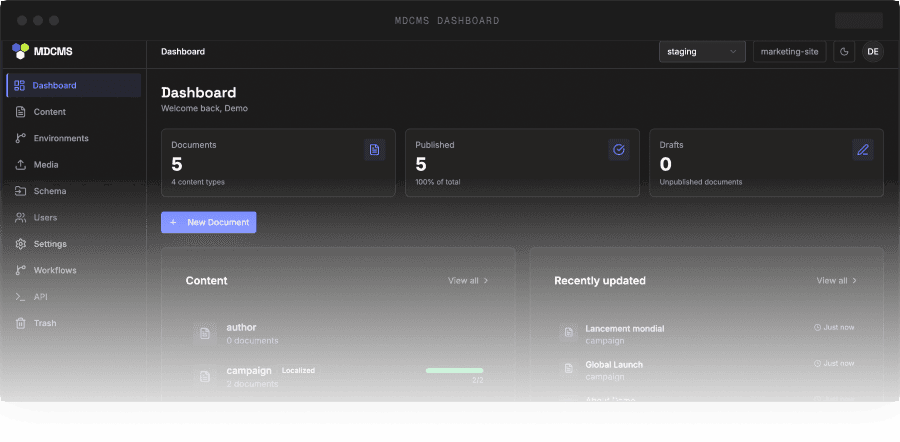
MEET MDCMS
The first content operations platform with everything you need
MDCMS solves a gap between traditional CMS platforms that lock content into vendor dashboards and file-based Markdown/MDX workflows that developers and AI tools love but editors cannot comfortably use.
Manage the full content lifecycle in one platform
Create, manage, and scale content across multiple markets, without relying on developers. Import existing projects in minutes, prompt your website design, and edit them in a collaborative visual Studio.
Built with your AI agents
The first AI-powered CMS where AI isn't a feature bolted on, but a user across your content, config, and codebase. Use our Marketing Agent and Pre-sales Agent for free.
Three interfaces, one data layer
Developers define schemas in code and sync via CLI. Marketing team gets a collaborative visual Studio. AI agents process content through the same API. Each role works in the space designed for them.
Switch CMS in weeks, not quarters
Open-source migration tools for Contentful, Sanity, Strapi, and existing Markdown projects. MDCMS detects your schema, imports your content, and sets up a visual Studio. Your frontend doesn't change.
PICK YOUR ROLE
Built for every role on your team, including the AI agents
For Developers
Save weeks of CMS setup and skip the ticket queue
MIT Licensed
Open Source
Code-first schemas in TypeScript, MCP-native AI agents, and Markdown-first content that works with the LLMs you already use. Pull content locally, push atomically, let AI agents do the bulk work.
Learn moreCONTENT
Pull your entire library locally via CLI. Run it through Claude, GPT, or any local model for translations, rewrites, audits, or restructuring.
CONFIG
Describe what you need in natural language and the agent updates your mdcms.config.ts directly. Make schema changes, new content types, and field modifications.
CODEBASE
The module system exposes type-safe contracts that AI agents can read, implement against, and extend. Build integrations, create custom endpoints, add new capabilities.
COMPARE YOUR POSSIBILITIES
Created for what other CMS platforms struggle with
Most CMSes manage content. MDCMS manages the full lifecycle where developers, marketers, and AI agents work through one content layer.
| Feature | MDCMS | Typical Commercial CMS | Typical Open-source CMS | Wordpress |
|---|---|---|---|---|
| AI workflows (native) | Native | Limited/add-ons | ||
| Prompt-based page creation | ||||
| SEO-driven structured content | ||||
| Multi-region content (native structure) | Possible/complex | Limited | Workarounds | |
| Developer independence | Partial | |||
| Migration speed (large scale) | ||||
| Content velocity at scale | High | Medium | Medium |
IMPLEMENTATION OPTIONS
Use MDCMS your way
Self Implementation
Open-source and ready to go
MDCMS is open-source and can be implemented by your internal team.
- Free to use
- Full control over codebase
- Active community contribution
Recommended
With Blazity
BlazityWork with the team behind MDCMS
Accelerate your implementation with the engineering team that built MDCMS from the ground up.
- Faster time to production
- Expert-led migration
- Architecture tailored to your business
Shape the roadmap with us


Watch: Getting Started with MDCMS
GET STARTED
Let's talk about how MDCMS fits your setup
Book a call to explore how MDCMS could work for your team, your content, and your markets. No commitment. We'll get back to you within 12 hours.

BUILT BY a team trusted by global companies